> For the complete documentation index, see [llms.txt](https://docs.spicychat.ai/llms.txt). Markdown versions of documentation pages are available by appending `.md` to page URLs; this page is available as [Markdown](https://docs.spicychat.ai/product-guides/rulebooks/playtest-and-checks.md).
# Playtest and checks
## Playtest
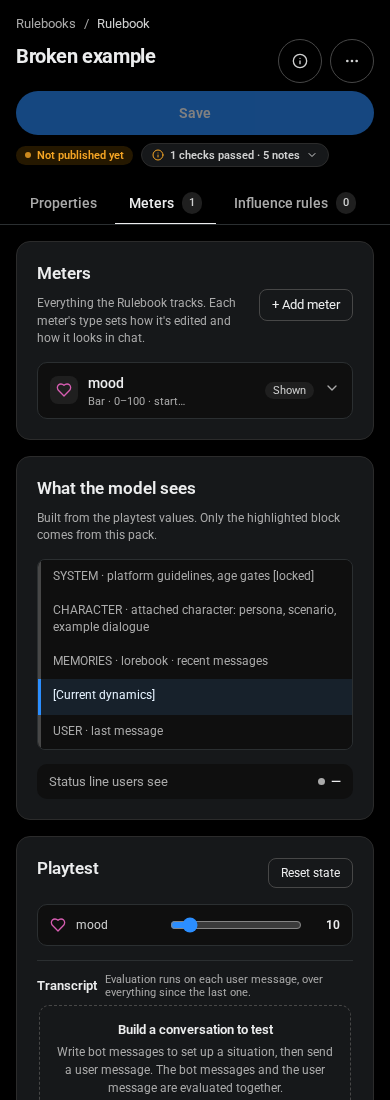
1. Drag any meter to a value to preview the status line and the instructions that would apply. Nothing is saved.
2. Write a bot message, then a user message, and click Send & evaluate. Evaluation runs on each user message, over everything since the last one.
3. Read the trace: each question, the model's answer and whether it passed the bar; the resulting changes; notes for [cooldown](/product-guides/rulebooks/making-meters-move.md#ai-rules), "already fired once", clamping, per-turn caps, rules skipped because [Only when](/product-guides/rulebooks/making-meters-move.md#ai-rules) was not true, and rules dropped because a higher rule in the list counted; the clock's skip decision and what Detect from messages read.
4. Re-run repeats the last evaluation with your slider changes kept. Reset state starts over. Cooldowns and quiet-turn counts carry between evaluations, like in a real chat.
For a Rulebook that is already Unlisted or Public, [Save for testing](/product-guides/rulebooks/visibility-review-and-versions.md#save-for-testing-and-submit-for-review) does more than playtest: it saves a test version you can attach to your own characters and personas and play in real chats, while the reviewed version stays untouched.
## Test the edges before you save
* Both ends of every meter: does the first and last level read well?
* A turn with nothing relevant: did only [decay](/product-guides/rulebooks/making-meters-move.md#decay) move?
* A message that references the past ("remember when...") should not fire the rule again.
* Two rules on one meter in one message: did the higher one in the list count as intended?
* Each ending ([combined rule](/product-guides/rulebooks/influence-rules.md#combined-rules)) alone, and the two endings together.
* For a [Story clock](/product-guides/rulebooks/meters.md#story-clock): a plain line, "the next morning", and a time written in the text.
## Checks list
(the chip under the Save button, for example "2 checks passed · 4 notes")
* Largest instruction block \~N / 1200 tokens: keep under 1200; above 1800 the Rulebook cannot be saved.
* "X never moves": add a [keyword](/product-guides/rulebooks/making-meters-move.md#keywords), an [AI rule](/product-guides/rulebooks/making-meters-move.md#ai-rules), [decay](/product-guides/rulebooks/making-meters-move.md#decay) or per-message change. [Public and Unlisted](/product-guides/rulebooks/visibility-review-and-versions.md) submissions are blocked until every meter can move.
* "N combined rules can never match" and "N levels add no instruction".
* The rest are field errors shown on the card they belong to.
The Playtest panel
Errors shown in the editor
***
**Up next:** Keep your Rulebook private, or share it with everyone.
{% content-ref url="/pages/AUu8w9U0fa6Pyuluz3NM" %}
[Visibility, review and versions](/product-guides/rulebooks/visibility-review-and-versions.md)
{% endcontent-ref %}
---
# Agent Instructions
This documentation is published with GitBook. GitBook is the documentation platform designed so that both humans and AI agents can read, navigate, and reason over technical content effectively. Learn more at gitbook.com.
## Querying This Documentation
If you need additional information that is not directly available in this page, you can query the documentation by asking a question.
Perform an HTTP GET request on the following URL with the `ask` and `goal` query parameters:
```
GET https://docs.spicychat.ai/product-guides/rulebooks/playtest-and-checks.md?ask=&goal=
```
`ask` is the immediate question: it should be specific, self-contained, and written in natural language.
`goal` is what the user is ultimately trying to achieve, the reason they need the answer. Sharing it helps GitBook give you a better, more relevant answer. A goal is most helpful when it describes the outcome the user wants rather than restating the question. For example, with `ask=how do I create an API token`, a goal like `automate deployments from our CI pipeline` lets GitBook tailor the answer to that use case.
The response will contain a direct answer to the question and relevant excerpts and sources from the documentation.
Use this mechanism when the answer is not explicitly present in the current page, you need clarification or additional context, or you want to retrieve related documentation sections.