> For the complete documentation index, see [llms.txt](https://docs.spicychat.ai/llms.txt). Markdown versions of documentation pages are available by appending `.md` to page URLs; this page is available as [Markdown](https://docs.spicychat.ai/advanced/tokens-and-context.md).
# Tokens & Context
Tokens are the pieces of text the AI uses to read your messages and generate replies.
Every word (or part of a word), symbol, and emoji uses tokens.
Understanding **tokens** and the **context window** helps you get longer, more consistent chats.
### What are tokens?
Tokens are the units the AI uses to process text.
Every time you:
* send a message
* receive a reply
* create a character
* write a greeting, scenario, or example dialogue
…you are using tokens.
Token limits depend on your chosen [AI model](/product-guides/premium-features/ai-models.md) and your subscription tier.
### How tokens affect character creation
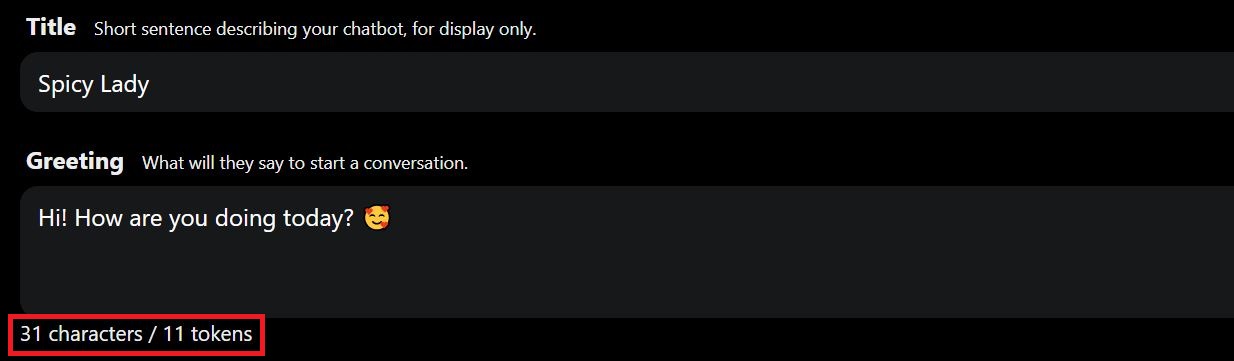
When creating a character, every field uses tokens:
* personality
* greeting
* scenario
* background and lore
* example dialogues
You can see token usage under each text box.
{% hint style="info" %}
A common target is keeping character setup concise (often around **800–1,100 tokens**). This leaves more room for the conversation.
{% endhint %}
### What is a context window?
The **context window** is the amount of text the AI can “see” at one time. It uses that text to generate the next reply.
Think of it like a desk with limited space:
* your recent messages are on the desk
* the character definition is on the desk
* recent replies are on the desk
* generation instructions and settings are on the desk
When the desk gets full, older messages are removed to make room.
#### Why this matters
If an older message no longer fits, the AI may not use it. That can break continuity in long chats.
Older details stay consistent if they are:
* repeated
* summarized
* stored using memory systems
{% hint style="success" %}
Simple rule: the AI remembers the most recent parts best.
{% endhint %}
### Why older messages get forgotten
AI does not have unlimited live memory during a chat.
As your chat grows, the system must fit all of this into the context window:
* character definition
* your messages
* character replies
* generation settings and instructions
When there is no room left, the oldest messages drop out.
{% hint style="danger" %}
Once a message is outside the current context window, the AI may no longer use it.
{% endhint %}
### Why we don’t always use the model’s maximum context
Modern models can support very large context windows.
Larger context also increases:
* cost
* response time
* compute usage
To keep SpicyChat fast and affordable, we set context limits by tier, and each model has its own ceiling too.
### How the context window fills up (examples)
Your context window is shared by everything the AI needs for a reply, including:
* character definition
* recent messages
* recent replies
* generation instructions and settings
So even if your tier supports 4,096 tokens, not all 4,096 are available for chat history.
#### Example: Free tier (4k token context)
Let’s say:
* character definition = **1,000 tokens**
* average message (user or bot) = **\~150 tokens**
That leaves roughly **3,096 tokens** for recent conversation content. This is before extra formatting and instruction overhead.
At \~150 tokens per message, the AI may only keep around **20 recent messages** visible. This is a rough estimate.
{% hint style="info" %}
Exact numbers vary with message length, character setup size, and generation settings.
{% endhint %}
#### Example: I'm All In tier (32k token context)
With a much larger context window, far more of the recent chat stays visible.
In many chats this means hundreds more messages stay “in memory”. At an average message length of around 150 tokens, a 32k context holds roughly **100–150 more messages** than a 16k one.
{% hint style="info" %}
This is an estimate, not a guarantee. Longer messages reduce how many fit.
{% endhint %}
### Context window by subscription tier
This is the maximum conversation context (the total amount of text the AI can work with at once):
* **Free Users:** Up to **4,096 tokens**
* **Get A Taste Users:** Up to **4,096 tokens**
* **True Supporter Users:** Up to **8,192 tokens**
* **I’m All In Users:** Up to **32,768 tokens**, depending on the model
{% hint style="info" %}
**Your context also depends on the model.** The numbers above are the most your tier allows. Each AI model has its own maximum as well, and your chat uses whichever is lower. If you’re on I’m All In and pick a model that tops out at 8K, that chat runs at 8K. Each model’s context size is listed on the [AI Models](/product-guides/premium-features/ai-models.md) page.
{% endhint %}
{% hint style="warning" %}
This total is shared across everything needed for the reply. It is not just your most recent messages.
{% endhint %}
### How this affects long conversations
As a conversation gets longer:
* the AI keeps the most recent messages
* older messages may drop out of the context window
* continuity can weaken over time
{% hint style="warning" %}
If an important detail was mentioned much earlier, repeat it or summarize it.
{% endhint %}
### Reply tokens vs context window
These are not the same thing.
#### 1) Context window
How much total text the AI can see and use at once.
#### 2) Reply tokens
How many tokens the AI can spend generating a single reply.
If reply tokens are too low, responses get shorter or cut off. This can happen even with a large context window.
### Reply token limits by tier
Per-reply tokens depend on your settings and subscription tier:
* **Free and Get A Taste Users:** Up to **180 tokens per reply**
* **True Supporter and I’m All In Users:** Up to **300 tokens per reply**
You can change this in [Generation Settings](/advanced/generation-settings.md).
{% hint style="info" %}
Many users confuse **reply length** with **memory**.
They are related, but they are not the same thing:
* **Reply tokens** = how long a response can be
* **Context window** = how much the AI can “see” at once
{% endhint %}
### Semantic Memory (subscriber benefit)
Subscriber tiers may also benefit from **Semantic Memory 2.0**.
Semantic memory helps preserve important details from earlier in the chat. It can help even when the original messages no longer fit in the context window.
It improves long-term continuity in long roleplays.
{% hint style="success" %}
Semantic memory helps with continuity when older messages drop out.
{% endhint %}
Learn more in [Semantic Memory 2.0](/product-guides/premium-features/semantic-memory-2.0.md) and [Memory Manager](/product-guides/premium-features/memory-manager.md).
### Getting the most out of your tokens
* Keep character definitions concise and focused
* Avoid long greetings and huge example dialogues unless needed
* Repeat or summarize key details in long chats
* Increase reply tokens in Generation Settings for longer replies
* Use higher tiers for a larger context window and better continuity
### Quick summary
* **Tokens** measure text
* **Reply tokens** affect response length
* **Context window** affects what the AI can use at once
* In long chats, older messages may drop out of active context
* Higher tiers allow larger context windows
* **Semantic memory** helps preserve important details beyond active context
{% hint style="info" %}
If a character forgets something from much earlier, it usually means it no longer fits in the current context window.
{% endhint %}
---
# Agent Instructions
This documentation is published with GitBook. GitBook is the documentation platform designed so that both humans and AI agents can read, navigate, and reason over technical content effectively. Learn more at gitbook.com.
## Querying This Documentation
If you need additional information that is not directly available in this page, you can query the documentation by asking a question.
Perform an HTTP GET request on the following URL with the `ask` and `goal` query parameters:
```
GET https://docs.spicychat.ai/advanced/tokens-and-context.md?ask=&goal=
```
`ask` is the immediate question: it should be specific, self-contained, and written in natural language.
`goal` is what the user is ultimately trying to achieve, the reason they need the answer. Sharing it helps GitBook give you a better, more relevant answer. A goal is most helpful when it describes the outcome the user wants rather than restating the question. For example, with `ask=how do I create an API token`, a goal like `automate deployments from our CI pipeline` lets GitBook tailor the answer to that use case.
The response will contain a direct answer to the question and relevant excerpts and sources from the documentation.
Use this mechanism when the answer is not explicitly present in the current page, you need clarification or additional context, or you want to retrieve related documentation sections.